A timesheet app for Australian subcontractors and casual crews
Subcontractors and casuals check in on Telegram or a browser link. You approve a clean record per site, and hours can go to Xero as draft bills.
Watch the 80-second story
What it does
Subcontractors and casuals check in and out at the site in Telegram, or with a personal browser link — usually nothing new to install. Most crews already have Telegram. If they do not, they can use the browser link, or install Telegram once for free. They can add a short note at knock-off, so you are not reconstructing the day from memory on Friday.
A named person in your business approves the hours. Approved subcontractor hours can become draft bills in Xero for you to check; they are never paid or approved by ZimQi on its own. You still review the draft, and you still pay the subbie in the way you already do.
The same loop takes your own site dockets and checklists, as questions and answers. Upload a Word, Excel, PDF or a photo of a paper form you already use. Workers answer one question at a time in Telegram or on the web, with pause and resume. When the form is finished, ZimQi saves a branded PDF or Word file, with your logo, to your Google Drive or Dropbox. OneDrive is coming soon. Paper timesheet photo upload (Beta). The forms remain yours. ZimQi does not issue certificates and does not claim ISO or compliance outcomes.
This is the walkthrough of how subcontractors check in, how you approve, and how hours can become Xero draft bills. For a side-by-side cost comparison, see Subcontractor timesheet and form app: cost comparison.
See it
Why per-seat tools get expensive with a rotating subbie pool
Many workforce and job tools charge a monthly fee for every profile, including people who only work a few days a month. With a rotating subbie pool, you can end up paying for seats that sit idle. That is a poor fit when the crew changes from job to job.
ZimQi uses a flat monthly plan and worker-day credits: 2 credits equal 1 active worker-day. On Team (A$163.90/mo inc GST (A$149 ex GST)) and Scale (A$328.90/mo inc GST (A$299 ex GST)), crew and subcontractor profiles are unlimited. A profile that does not work that day does not use credits. Starter and Solo have smaller crew and site caps, which are spelled out on the pricing page. A worked cost example, next to other tools, is on the cost comparison page — we do not repeat the whole table here.
Plans are in Australian dollars, with GST shown. Every account starts with a 30-day free trial, up to 300 credits, no card needed.
How a day runs
The loop is short on purpose.
- Add the person. A name and a phone number is enough to get started. You can add subcontractors and casuals the same way you add employees. They do not need a ZimQi login of their own if they are using Telegram or a personal link.
- They check in on site. When they arrive, they check in, in Telegram or in the browser. If your company turns location on, they share a location once at check-in — not live tracking, and not all day. At knock-off they check out, share a location once more if location is on, and can add a short note about the work done.
- You approve. A named person reviews the hours. If something looks unclear, it is flagged. You approve, or you send it back. Approved subcontractor hours can become draft bills in Xero, with you still checking them before anything is paid.
If a subbie works at more than one site in the same day, each site is its own check-in. The records are not merged. Forms can be filled in the same chat, one question at a time, with pause and resume, so a long docket does not have to be finished in one sitting. Name, site, date and time can be pre-filled from the check-in, so the crew is not retyping what the system already knows.
If they forget to check out, they get a nudge. They can also check in at a site they were not originally assigned to that day — for example a call-out — and the timesheet is marked so the person who approves can see it.
Your records, in your Google Drive or Dropbox
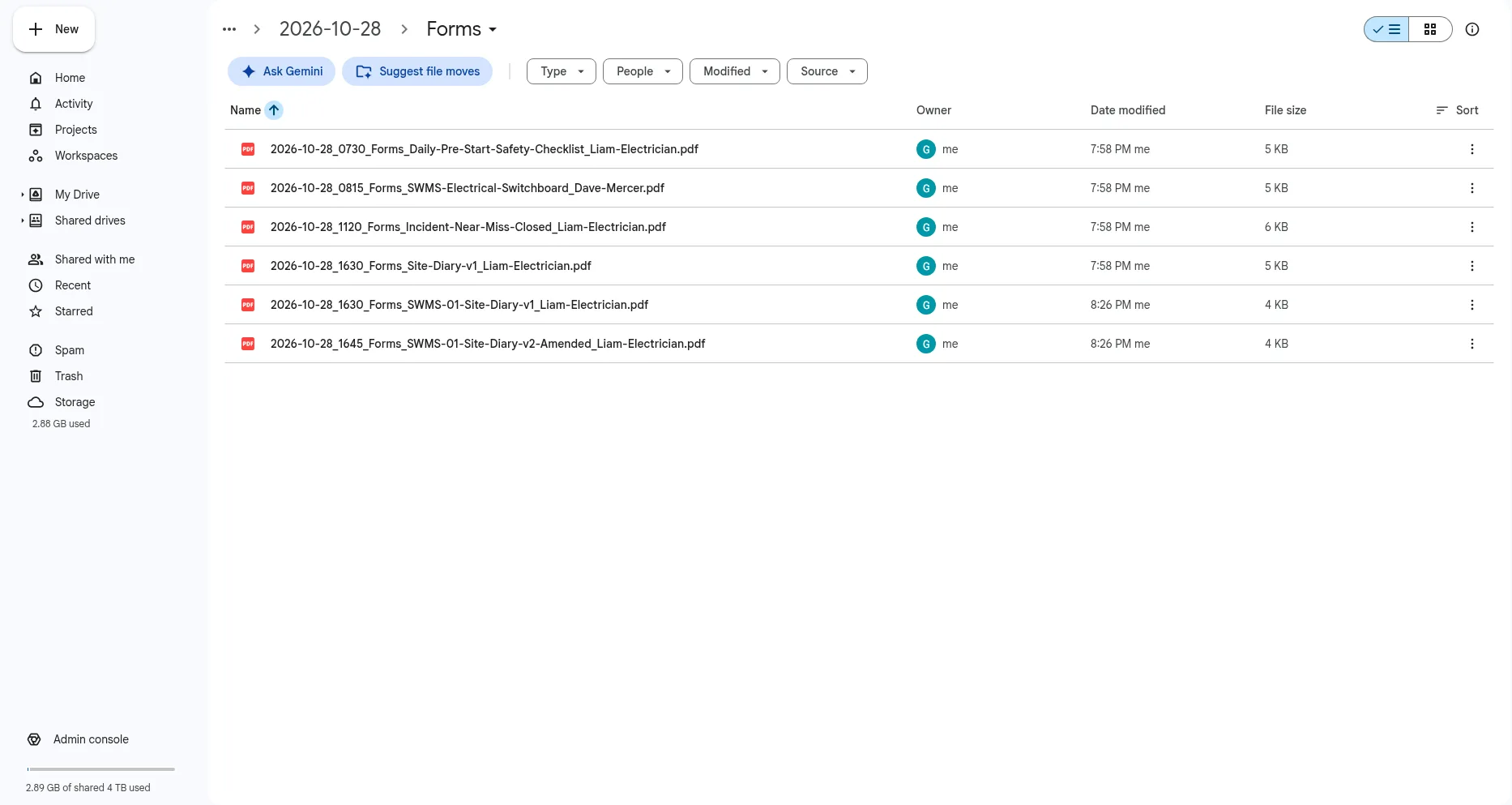
Finished forms and hours can be filed to your own Google Drive or Dropbox, in a folder per site. You own the files. ZimQi is not a substitute for your document control process, and it does not keep a parallel “official” copy that overrides yours.
When to use someone else
ZimQi is a fit when the pain is chasing field and subcontractor hours and site paperwork, and you already have — or will keep — a payroll or job tool. It is not a fit for every subcontractor operation.
If you need geofence-blocked check-in (the worker cannot check in unless they are inside a fence), automatic invoice matching against GPS hours, or a full subcontractor compliance suite (insurances, tickets, onboarding workflows), look at specialist tools such as Swift Checkin, SubbieSure or Humanz, and confirm current features on their own sites. Those products may be the right starting point for that job.
ZimQi does not interpret Modern Awards and does not calculate pay rates, allowances or overtime rules. Your bookkeeper or payroll software still does that work. It does not offer live GPS tracking. You can pin a supervisor to each site, and they get that site's approval requests and reminders in Telegram. Roster import and custom multi-step approval chains are not currently offered. WhatsApp is coming soon; today the crew use Telegram or a browser link.
Free contractor and construction timesheet template
If you are not ready to move the crew across, start with a spreadsheet. Our construction and contractor timesheet template is a weekly Excel or Google Sheets layout, with site, hours, breaks and sign-off. No email is needed to download it. More free downloads, including a toolbox talk template, are on the templates page.
Download the free Excel template (.xlsx)
When a template is no longer enough — sheets coming back late, five different formats, someone retyping everything into Xero — the walkthrough on this page is the next step. For how the product sits in the wider Australian timesheet market, see Timesheet app Australia and How it works.
FAQ
Do my subcontractors need to install a new app?
No. ZimQi runs inside Telegram, which most phones already have or can install free in a minute.
Where are the records kept?
In your own Google Drive, in a dated folder per job or site. You own the files.
Do I have to replace my current software?
No. ZimQi sits alongside what you already use and can export to Xero.
How long does setup take?
Most teams are checking in the same day. Add your crew, pick a form, done.
Is the timesheet template really free?
Yes. Download it, use it on paper or in ZimQi. No sign-up needed.
Do subcontractors have to download an app?
No. They use Telegram, which most already have, or a personal browser link. There is usually nothing new to install.
Does ZimQi pay the subbie?
No. Approved subcontractor hours can become draft bills in Xero, for you to check. ZimQi never pays or approves on its own.
Can they fill our docket, not a generic form?
Yes. Upload the form you already use. Workers answer in Telegram or on the web. A branded PDF or Word file goes to your Drive or Dropbox. The form remains yours. ZimQi does not issue certificates.
Try it free on Telegram Start with email